Payments
Connect gateways, configure action modes, and add manual methods in Payments.
Sellerlane POS is designed for a real counter: one customer can wait while you bill another, without merging their carts or losing a payment that is still settling. Each sale tab owns its customer, items, discounts, delivery choice, notes, stock reservation, loyalty holds, checkout, and payment attempt.
Diagram viewer: scroll horizontally to inspect the full flow.
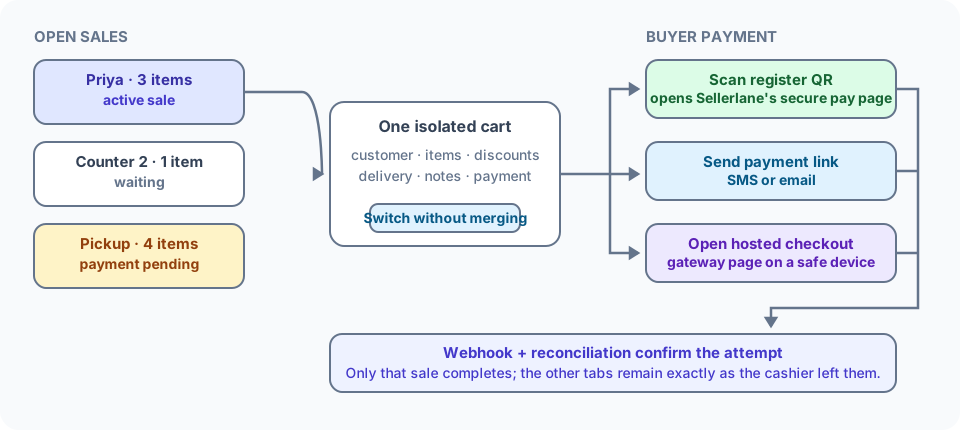
You can keep up to 10 open sales per store in one browser.
Select New sale. Sellerlane reuses the current tab when it is already an empty sale, so the register does not accumulate blank carts.
Rename a tab to something recognizable, such as Asha, Table 4, or Pickup 5:30. Otherwise it keeps its automatic Sale number.
Switch tabs while another customer decides or completes payment. Every tab shows its name, item count, total, and a readable Checkout open or Payment pending badge.
Finish the active sale. Only that tab is completed; the waiting tabs keep their exact carts and checkout state.
The browser stores only a small, store-scoped tab registry: cart reference, human label, item count, total/currency, location, and checkout-state summary. The authoritative cart stays on the server. Email, phone, card data, payment payloads, and tokens are not copied into local tab storage.
Discard sale closes the server session and supersedes its current payment attempt. A merely created attempt becomes canceled; a pending attempt queues a provider cancel operation; an authorized attempt queues a void. Checkout, loyalty, and stock holds are released by that server cleanup. If closing fails, Sellerlane keeps the tab so the cashier can retry instead of hiding unfinished work. If it was the last tab, a replacement empty sale is opened before the register leaves the old route.
One search box covers everything the register can sell. Type a product name, SKU, barcode, brand, tag, or type; matching products and bundle offers appear together in a single result list, and the Products and Bundles filter chips narrow it to one kind when the counter is busy. Results are scoped to the sale’s location.
A bundle offer shows up only while it is live for POS — Active, inside its Active dates, and Point of Sale enabled. Upsell rules are online-only and never appear at the register. See Bundles, offers & upsells for how offers are built and scheduled.
The buyer should use their own phone or a gateway-hosted page. The cashier does not type a visitor’s card number into the seller admin.
| Action | Buyer experience | Delivery |
|---|---|---|
| QR code | Buyer scans a Sellerlane secure payment URL, which opens the connected gateway checkout | Shown on the register; this is a scan-to-open hosted-checkout bridge, not a claimed provider-native UPI payload |
| Payment link | Buyer opens the same safe launch page on their own device | Show on register, send by configured SMS, or send by email |
| Hosted checkout | Opens the provider checkout flow | Use on a safe buyer-facing device or handoff flow |
| Manual method | Cash, external terminal, bank transfer, manual UPI, or another offline process | Cashier records reference/collection according to the method’s settlement policy |
Sellerlane never sends a bare provider secret, form payload, or SDK session in an SMS/email. The public link contains an unguessable Sellerlane payment-attempt capability; the launch page retrieves the current provider action server-side.
For INR POS sales, Razorpay, PayU, and Cashfree can be presented through:
The method settings can narrow the allowed actions and choose a default. If the stored restriction is invalid or has no compatible action, Sellerlane hides the method and fails closed rather than silently widening the merchant’s policy. Online checkout remains hosted-checkout only.
The success message appears only after a durable SMS/email outbox accepts the link. It says the delivery was queued, because carrier acceptance and handset delivery happen asynchronously. If dispatch is unavailable or the contact is missing, the cashier can display the link or QR instead.
Starting a gateway action creates one attempt for the prepared quote, method, amount, currency, mode, delivery, recipient, and return context. A materially different request does not reuse the wrong QR or link.
Webhooks and reconciliation update the attempt. The order is completed as paid only after confirmed capture; delayed callbacks do not require the cashier to keep the modal open.
Use a manual method configured Mark paid immediately only after the cashier has actually collected the money. The POS order completes as paid without asking a visitor to enter card details in Sellerlane.
A method configured Pending until confirmed creates an awaiting-payment order. Automatic digital, event, gift-card, key, and carry-out delivery remains held until staff record collection, unless an authorized seller deliberately uses the audited manual override.
Changing the selected payment method or action after preparation requires Prepare again. Sellerlane does not complete a quote using the stale method. Return and cancel URLs are server-derived for POS, so redirect gateways can land on the safe payment-status page even when the register supplied no buyer URL.
| POS order | Address behavior | Fulfillment behavior |
|---|---|---|
| Carry-out | No shipping or billing address required | Uses the selling location; eligible no-ship items can complete after payment |
| Pickup order | No shipping address | Pickup group/location is explicit; no carrier package is created |
| Ship to customer | Shipping address required | Adding an address enters delivery mode; select a shipping option and Sellerlane routes/reserves from eligible locations |
For a ship-to-customer sale, the register location is the preferred origin, not a guarantee. If another eligible location provides the valid route and stock, the order can receive a fulfillment order for that location.
Asha’s three-item sale is open. Rename it Asha, select New sale, and bill Ravi. When Asha is ready, switch back; her discounts, customer, stock reservations, and total are unchanged.
Ravi scanned the Sellerlane QR for a Razorpay checkout and his bank is slow. The tab shows Payment pending. Start another sale if Ravi is still completing payment. If the sale truly needs to be abandoned, discard queues the safe provider cancel/void path. Webhook or reconciliation completes only Ravi’s attempt when capture arrives first.
Select Payment link, confirm the buyer’s phone, and choose Send SMS. The register reports queued only when the transactional outbox accepts it. If SMS is not configured, show the QR or payment link on screen.
Payments
Connect gateways, configure action modes, and add manual methods in Payments.
Order & rewards lifecycle
Understand payment gates, COD, fulfillment, self-service, and rewards in Order & rewards lifecycle.
Manual payment methods
Configure cash, terminal, COD, bank transfer, and manual UPI in Manual payment methods.
Addresses at checkout
Compare carry-out and ship-to-customer requirements in Addresses at checkout.