POS billing & payments
Run simultaneous in-store sales and choose a safe buyer payment action in POS billing & payments.
This guide is the end-to-end map of what Sellerlane does after a buyer checks out. It connects payment, fulfillment, inventory, self-service, loyalty, referrals, and review rewards so the rules do not contradict each other.
The central rule is simple: money, order lifecycle, and fulfillment are three different states. A paid order can still be unfulfilled. A fulfilled order can later be partially refunded. A canceled order can keep payment history without allowing any new delivery.
Diagram viewer: scroll horizontally to inspect the full flow.
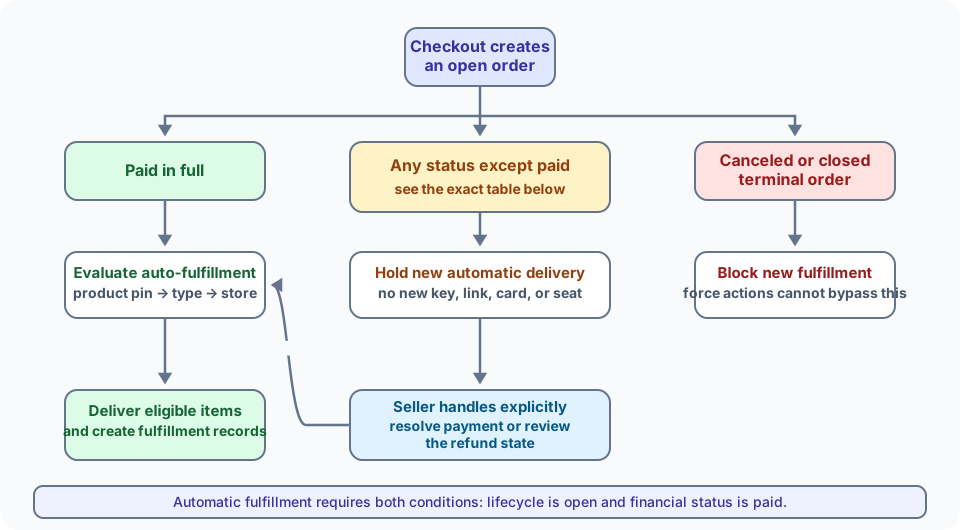
The same decision is restated below so it remains searchable and readable without the diagram.
| Current order state | Automatic fulfillment | Buyer self-service | Seller action |
|---|---|---|---|
| Paid · Open | Runs for eligible non-shipping and carry-out items according to the product → type → store policy | Normal snapshotted policy applies | Fulfill, split, move, hold, or release |
| Payment pending · Open COD or other manual method | Held. No download, key, gift card, event seat, meeting, or no-ship fulfillment is created automatically | Remaining unfulfilled quantities may be canceled when policy permits. Standalone refunds, delivery, redelivery, and rescheduling stay blocked; cancellation can refund only genuine prepaid tender | Record collection to mark paid, or use the explicit audited unpaid-fulfillment override |
| Partially paid · Open | Held until fully paid | Normal snapshotted self-service policy applies; any refund exposure is capped to tender actually collected | Collect the balance or use a deliberate seller override only where exposed |
| Authorized · Open | Held until captured and fully paid | Blocked as unpaid | Capture the authorization, or use a deliberate seller override only where exposed |
| Voided · Open | Held | Blocked as unpaid | Take and record a new payment; a voided authorization cannot be captured |
| Partially refunded / Refunded · Open | Held because automatic delivery requires exact paid status | Normal snapshotted self-service policy applies; monetary actions are capped by remaining refundable tender | Review remaining quantities and refund state; use explicit audited fulfillment only when intended |
| Canceled / Closed | Never | Blocked | New fulfillment is blocked, including force actions |
An explicit seller override is for exceptional manual workflows, such as handing over a paid-at-the-counter item before the manual payment record is updated. It requires an authenticated seller actor and is auditable. It does not weaken the absolute canceled/closed lifecycle gate.
Automatic fulfillment never packs or ships a parcel. It can:
A physical item that needs shipping always remains in its fulfillment order for a person or fulfillment service to pack and ship.
Order #1042 is awaiting ₹1,000 at delivery and nothing has been collected. The buyer cancels before fulfillment. Sellerlane cancels the remaining quantity, releases its inventory, and removes the ₹1,000 manual collectible. The refund is ₹0, because no money was taken.
Order #1043 used ₹200 of store credit and leaves ₹800 for the courier. A pre-fulfillment cancellation removes the ₹800 collectible. At most the real ₹200 prepaid tender is refundable; Sellerlane never fabricates an ₹800 refund for uncollected cash.
Order #1044 is paid online. Its e-book may deliver immediately if the auto-fulfillment policy allows it. The shirt remains unfulfilled at the Bengaluru warehouse until staff pack and ship it.
The address rule follows the delivery promise, not the product title or sales channel.
| Checkout shape | Shipping address | What else is required |
|---|---|---|
| Online order with any shipped item | Required | A complete shipping option and delivery-group plan |
| Online pickup | Not required | Pickup location/group; pickup currently applies to the whole cart |
| Online digital, gift card, event, or no-ship-only cart | Not required | Billing address is still required online for invoice and tax |
| POS carry-out | Not required | Register location supplies the operational location |
| POS ship-to-customer | Required | Adding the address switches the sale into delivery mode; a shipping option is then required |
| Cancellation | Not required | Order identity and reason/policy checks |
| Return | Buyer shipping address is not requested again | The approved return shows the merchant return destination |
See Addresses at checkout for the buyer-facing version of these rules.
One order can become several fulfillment orders. Sellerlane groups quantities by delivery group and assigned location, so Order #1044 can ship one line from Bengaluru warehouse while another waits at Chennai warehouse.
Checkout reserves stock against the routing plan.
Successful order creation commits the reservation at the actual source location. A failed or canceled checkout releases it.
Each location receives its own fulfillment order. Staff can fulfill part of a quantity, hold it, or move the remaining plan to another eligible location.
A fulfillment consumes only the quantity recorded at that location. A canceled unfulfilled quantity releases the corresponding commitment.
Moving work does not merge unrelated shipments or silently move inventory. The order page keeps the source location, destination, remaining quantity, package, and tracking state visible. See Order routing and Locations & inventory.
Diagram viewer: scroll horizontally to inspect the full flow.
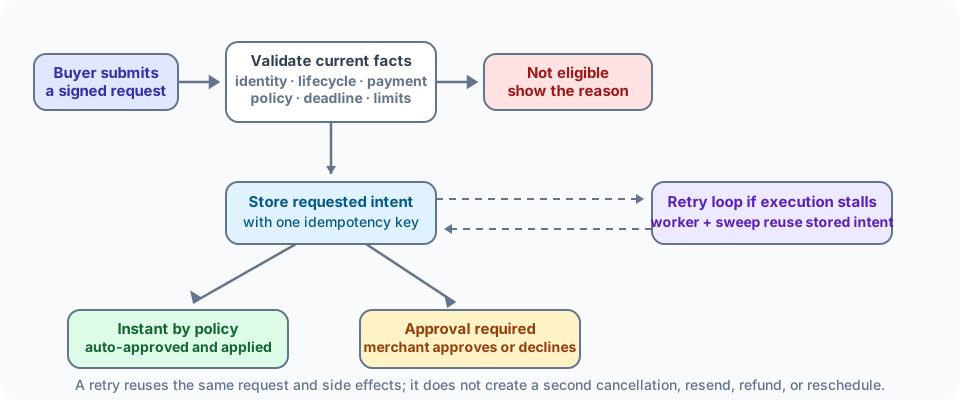
Every order keeps the policy version that applied when it was placed. A later settings edit does not unexpectedly rewrite the buyer’s window or fee. Current order facts—payment, quantities, lifecycle, duplicate open requests, and deadlines—are still rechecked when the action runs.
| Buyer action | Main eligibility | Approval and result |
|---|---|---|
| Cancel order or lines | Remaining ordered − fulfilled − canceled quantity and open cancel window; pending manual/COD is the sole unpaid exception | Configurable; default is approval. Cancels quantity, releases stock, reduces manual collectible, and can atomically refund real tender when policy or seller requests it |
| Return a physical item | Fulfilled but not already returned; delivery-anchored window, final-sale, reason, and condition rules | Approval by default. Creates the return/RMA workflow; refund can be a separate or approved linked action |
| Refund a digital item | Eligible active grant inside the digital window | Approval by default. Revokes entitlement/key before a configured refund is created |
| Redeliver a digital item | Active grant | Approval by default; an address matching neither the order contact nor the customer email always forces approval. Does not reset download count |
| Reset digital downloads | Active grant and redownload enabled | Always approval. Resets the meter, invalidates prior access, and grants fresh access |
| Reschedule an event | Active reservation, before event, within reschedule limit | Instant outside the configured cutoff by default; inside the cutoff forces approval. The reservation change and provider work are staged safely |
| Cancel an event | Active reservation before the event | Approval by default; cutoff and snapshotted refund percentage apply. Reservation/meeting access is revoked before any refund |
| Resend a gift card | Issued, spendable, and not future-scheduled | Instant by default, but only to the original recipient |
Damage, defect, wrong-item, or not-as-described reasons can bypass a normal window/final-sale block into manual review. They never become an automatic approval. Physical and digital items are handled in separate return requests so one decision cannot accidentally revoke the wrong kind of entitlement.
An instant request is stored as Requested · Auto-approved before Sellerlane tries the action. The synchronous path provides a quick result; an immediate background job and periodic sweep recover it if the browser, process, or provider fails at the wrong instant. The same idempotency key replays the original request, so retries do not double-cancel, double-refund, resend twice, or create a second meeting.
For COD/manual cancellation, only money actually collected can be refunded. Automatic cancellation refunds are off by default; a merchant can enable them in policy or choose Create refund while approving. Cancellation and that linked refund are then committed together.
Event meetings are provisioned asynchronously so a slow Zoom or Google Meet response does not hold an order write transaction open. Until a replacement is confirmed, regeneration keeps the usable meeting intact. The order shows a plain-language state such as Meeting provisioning failed with retry or regenerate actions; a broken join link is not presented as ready to the buyer.
Digital access is controlled at the grant, not merely at the email link:
See Event bookings and Digital products & downloads.
Diagram viewer: scroll horizontally to inspect the full flow.
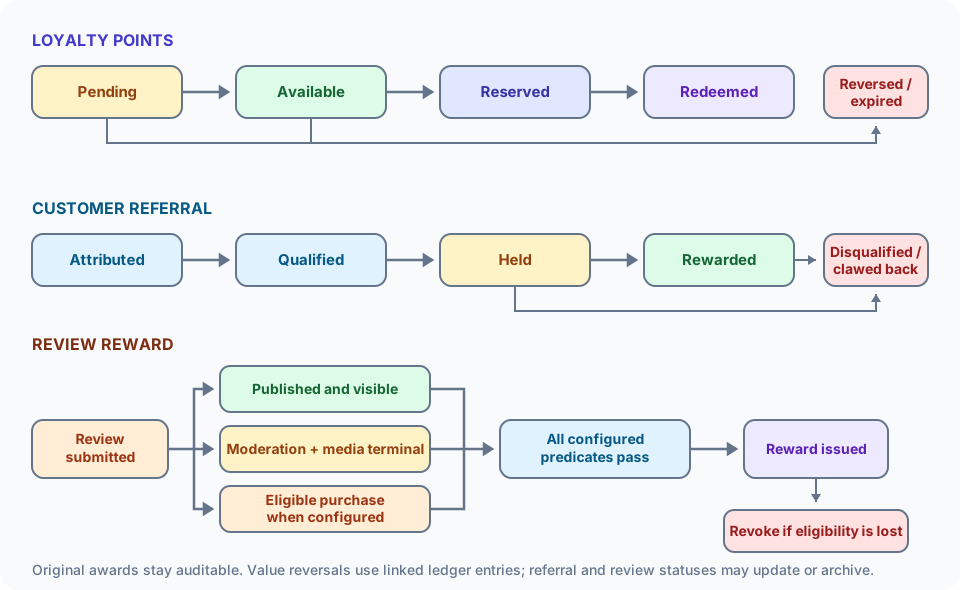
New earning and redemption fail closed unless the program is active and the customer passes the program’s eligibility, membership, and consent gates. Redeeming points never silently enrolls a customer.
| State | Meaning |
|---|---|
| Pending | Earned but still inside vesting/return hold; not spendable |
| Available | Vested and unexpired; can be used |
| Reserved | Held by an active cart/redemption so it cannot be spent twice |
| Redeemed | Consumed by the completed benefit |
| Unrecovered | Previously earned points should be reversed but were already spent; future earns repay this debt first |
Disabling or pausing the program blocks new earn and redemption while freezing vesting and expiry clocks. Resuming shifts those clocks by the pause duration; customers do not lose pending value merely because the merchant paused the program.
Refund and cancellation rules follow the snapshotted eligible merchandise basis:
Example: Asha earns 100 pending points and spends them after vesting. A later full cancellation cannot erase history or invent a negative spendable balance; it records 100 points of unrecovered debt, and Asha’s next earn repays it first.
A referral is not rewarded merely because someone opened a link. The durable flow is:
A signed advocate code is attached to the friend’s cart.
A paid, identified, non-test, non-canceled order must meet the snapshotted new-customer, currency, minimum-value, expiry, and program limits.
Deterministic self-referral is blocked. Uncertain household, address, device, or network evidence creates a merchant-review hold rather than declaring fraud automatically.
The advocate award waits for every maturity anchor: configured fulfillment, the event end for event tickets, the snapshotted digital-refund deadline for digital goods, and the referral review/return hold.
Sellerlane issues the discount or store-credit reward exactly once. A later disqualifying cancellation, chargeback, or refund can disable an unused code or reverse unspent credit.
Disabling referrals stops new attribution but does not erase already-qualified, snapshotted obligations. They still mature, cancel, or require review under the rules the merchant promised.
Digital example: A referred order is paid on July 1, has a 48-hour digital refund window, and a 14-day referral hold. The earliest advocate reward is July 17—not July 1 or July 15. For an event ending August 10, the event-end anchor applies before the configured hold even if its ticket was delivered at checkout.
For native reviews linked to Sellerlane orders, only an eligible paid purchase can confer a Verified purchase badge. Eligible financial states include paid, partially refunded, and refunded; pending, authorized, partially paid, voided, test, and canceled orders do not qualify. A fully canceled linked line also loses verification. A plain refund retains the historical badge because the buyer still made the purchase; cancellation, test conversion, voiding, or an ineligible line does not. Trusted imports and an authenticated admin’s manual verification are separate administrative assertions and need not have a local Sellerlane order.
A reward waits until all of these are true:
Exactly one richest review-incentive rule wins: video → photo → text → any. Rating never gates a reward. A 1-star and 5-star review follow the same rule. Loyalty review points can coexist with a discount or store-credit incentive by merchant choice; when both systems select points, loyalty owns the award and the duplicate points mint is suppressed.
| Change after submission | Reward result |
|---|---|
| Text/rating edit | Old moderation verdict is invalidated; reward waits or is revoked until the new content qualifies |
| Remove the last qualifying photo/video | Unused media-tier reward or media bonus is revoked; a valid base review earn can remain |
| Review deletion | Public/PII content becomes a privacy-scrubbed audit tombstone; media surfaces and unused reward value are revoked |
| Order/line becomes unpaid, canceled, test, voided, or fully canceled | Verified status and purchase-dependent reward are reconciled and clawed back |
| Ordinary refund with a still-valid purchase | Verified history remains; refund alone does not pretend the purchase never happened |
Pending review rewards do not expire before they are issued. Transient issuance failures remain retryable; deterministic permanent failures stay visible as failed. Buyer reward history keeps revoked, canceled, and failed rows visible but unusable, which explains what happened without presenting dead value as a balance.
Rewarded reviews disclose the incentive and are excluded from syndication destinations whose policy forbids compensation, including Shop. Never promise a reward for a positive rating.
This is a behavior comparison, not a blanket parity claim. Shopify can change its product rules; these links were checked on July 14, 2026.
| Workflow | Shopify’s documented behavior | Sellerlane’s documented behavior |
|---|---|---|
| Manual payments and COD | A manual-payment order is pending until the merchant receives the money and marks it paid. Shopify then lets the merchant fulfill it like an online-paid order. Shopify manual payments | The same pending-versus-paid distinction gates automatic delivery. Sellerlane additionally exposes a deliberate, authenticated, audited unpaid-fulfillment override for exceptional counter workflows. |
| Automatic fulfillment | A merchant chooses manual or automatic fulfillment, and a configured fulfillment service receives its request when the order is paid. Shopify fulfillment setup | Policy resolves from product → product type → store. It can automatically provision non-shipping entitlements or POS carry-out, but never pretends to pack and ship a parcel. |
| Buyer returns and cancellations | Signed-in customers can request returns for delivered items and cancellations for unshipped items. A cancellation request does not itself change the order; the merchant reviews it. Shopify self-serve returns and cancellations | Each action has an explicit policy: instant, approval-required, or blocked. Even an instant action is first stored durably, revalidated, and recovered idempotently if execution stalls. |
| Compensated reviews | Shop says merchants should not offer money, discounts, products, or refunds in exchange for reviews displayed through Shop. Shop product-review guidelines | A merchant can reward an honest review on owned surfaces without conditioning on rating. Sellerlane discloses the incentive and excludes rewarded reviews from destinations whose policy prohibits compensation. |
The practical lesson is to keep payment truth, fulfillment policy, buyer requests, and reward eligibility separate. Similar screen labels do not imply identical rules underneath.
The order detail page uses customer, product, location, payment-method, event, and fulfillment names in normal UI. Internal UUIDs remain available only where they help technical support; they are not used as the primary label.
The order detail surface distinguishes actionable conditions, including:
A buyer-facing page says Order received while payment is pending, not “Ready.” A canceled order is labeled explicitly. Problems remain visible with the next safe action instead of showing a raw error code or internal identifier.
POS billing & payments
Run simultaneous in-store sales and choose a safe buyer payment action in POS billing & payments.
Automatic fulfillment
Configure the product, type, and store policy in Automatic fulfillment.
Loyalty & referrals
Configure earning, redemption, maturity, fraud review, and reporting in Loyalty & referrals.
Review requests & rewards
Set timing, media qualification, rewards, and disclosure in Review requests & rewards.